Dashboard
Visualization Updates Enhancement
Dashboard has been enhanced with the following new visualization options and improved charting capabilities for existing tiles:
- The NetFlow tile now supports multiple visualization formats including Pie and Bar charts, providing more flexibility in analyzing data flow from interfaces. This enhancement enables you to choose the visualization that best represents your network traffic patterns.
The Value Count visualization now displays consistent color coding across all state categories, aligning with the platform’s standard color scheme. When grouping by states, you’ll see:
- Resource availability states - Uses standard availability indicator colors
- Alert states - Uses standard alert severity/status colors
- Incident states - Uses standard incident status colors
This standardization improves visual coherence across dashboards, making it easier to quickly recognize and interpret data patterns at a glance.
Scheduling Dashboard Reports Enhancement
You can now schedule dashboard reports to be automatically generated and sent to recipients at defined intervals, ensuring that stakeholders receive timely insights without needing to manually generate reports. You can specify the frequency (daily, weekly, monthly), recipients, and report format (PDF, CSV) to automate the distribution of dashboard insights.
Core Platform
InstalledSoftwares attribute added to Resource filters Enhancement
The installedSoftwares attribute has been added to Resource filters in both Classic device management policies (DMP) and Template-based Alert Definitions.
This enhancement enables more precise filtering based on installed software, making it easier to create targeted and effective policies for monitoring required software services. As a result, you can better manage and track specific software across resources.
Tenancy and RBAC
Permission-based command access for View-Only users Enhancement
Run Commands at the Resource level now supports a tiered permission model. Users with Devices View, Devices Edit, or Devices Create and Allow to Run Commands permissions can execute read-only diagnostic commands without requiring Device Manage access.
- Users with Devices View, Devices Edit, or Devices Create and Allow to Run Commands can run diagnostic commands such as CPU/Memory Usage, Disk Usage, Hostname, IPConfig, NSLookup, Ping, Processes, System Info, and more.
- State-changing commands (for example, Disable Windows Auto Update, Internal OpsRamp Agent Command, Restart OpsRamp Agent, Restart Remote OpsRamp Agent, Execute a Command) continue to require Device Manage permission.
- The command list is dynamically filtered based on user permissions.
This enhancement enables least-privilege access, allowing support users to run diagnostics without granting full device management permissions, improving security and efficiency.
Resource Management
OpenSSH/ED25519 Key format support for Linux Agentless (SSH) Credentials Enhancement
OpsRamp now supports OpenSSH/ED25519 key formats when configuring Linux OS - Agentless (SSH) type credentials.
View customization count for Global Template-Based Alert Definitions Enhancement
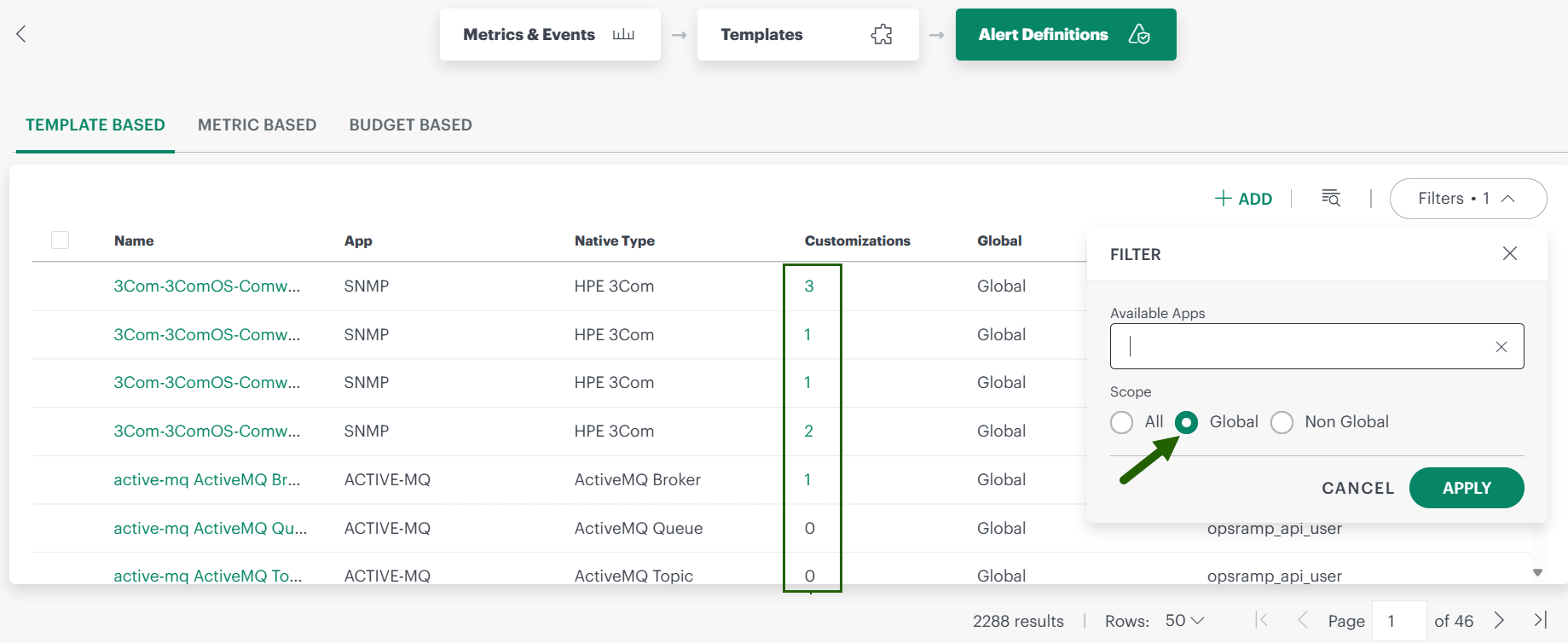
You can now view the number of customizations for each global Template-based Alert Definition on the Template-Based Alert Definitions listing page. This enhancement gives you insight into how many customizations exist for each definition.
- View counts via filter: Use the filter with Global scope to see the number of customizations for each Alert Definition.
- See detailed customizations: Click a number to view the specific customizations applied.
Event Management
Alert processing flow enhancement Enhancement
Alert processing now starts with First Response policies check and then moves to Alert Correlation policies check. This enhancement filters out suppressed Alerts from going to correlation and reduces load on the Alert Correlation engine.
Service Management
Service Desk Enhancements Enhancement
- Partner user support for client-specific Service Desk ticket status flows: Partner users can now view and use status flows at both Client and Partner Account levels.
- Incident notes update timestamp: When Incident ticket notes are updated, the “Last Updated” field displays the updated time, providing better visibility into note modifications.
Monitoring Management
SNMP trap processing with self-service UI (Beta) New Feature
OpsRamp now introduces a self-service capability to configure and manage SNMP trap processing directly from the UI, eliminating the need for backend support. Key features include:
- Upload and parse MIB files: Automatically parse trap definitions and add them to your scope (Service Provider, Partner, or Client)
- Search and customize: View, search, and customize trap definitions including severity, alert subject, and processing behavior
- Tenant-specific configurations: Copy global trap definitions into your scope and modify them without affecting other tenants
- Scope precedence: Scoped configurations take precedence over global definitions, enabling flexible customization
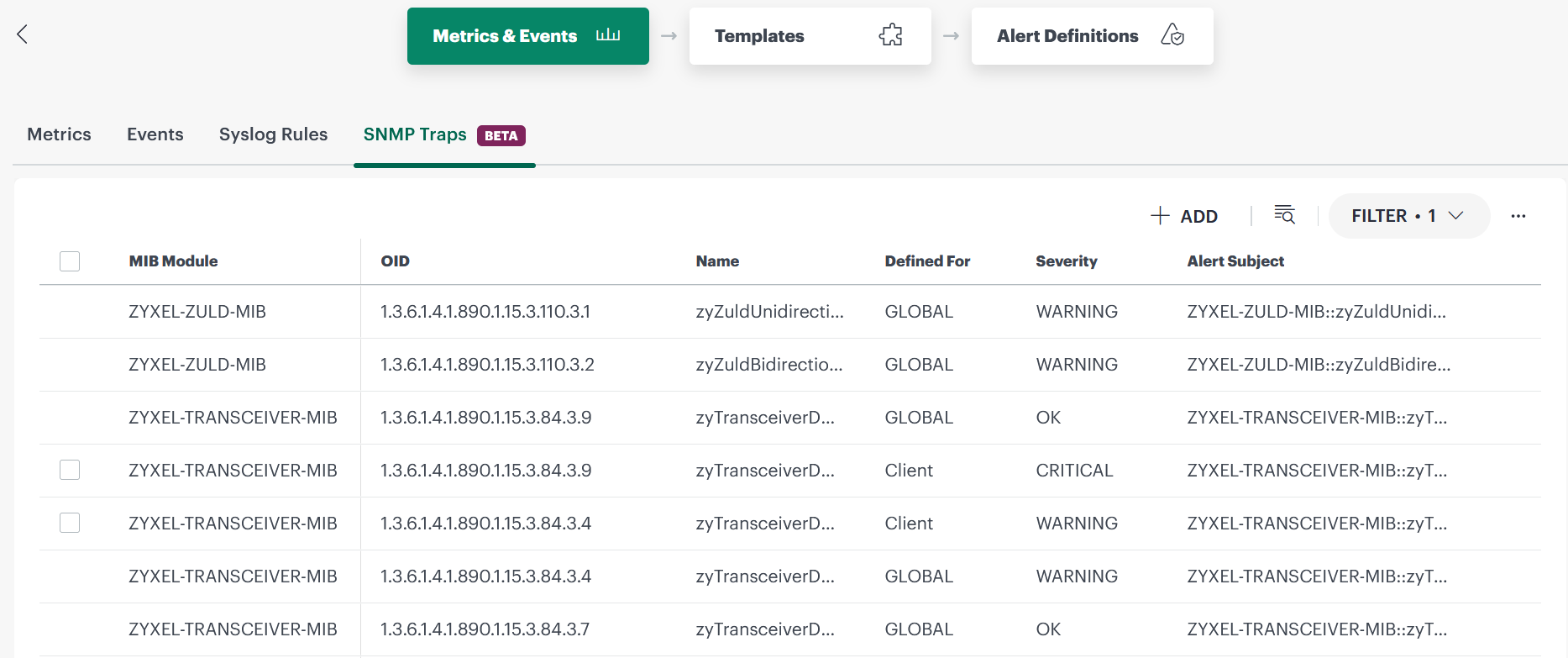
This approach reduces operational overhead, accelerates vendor-specific SNMP trap onboarding, and provides greater control over trap processing at your scope level.
Visibility for metric level Alert customization Thresholds Enhancement
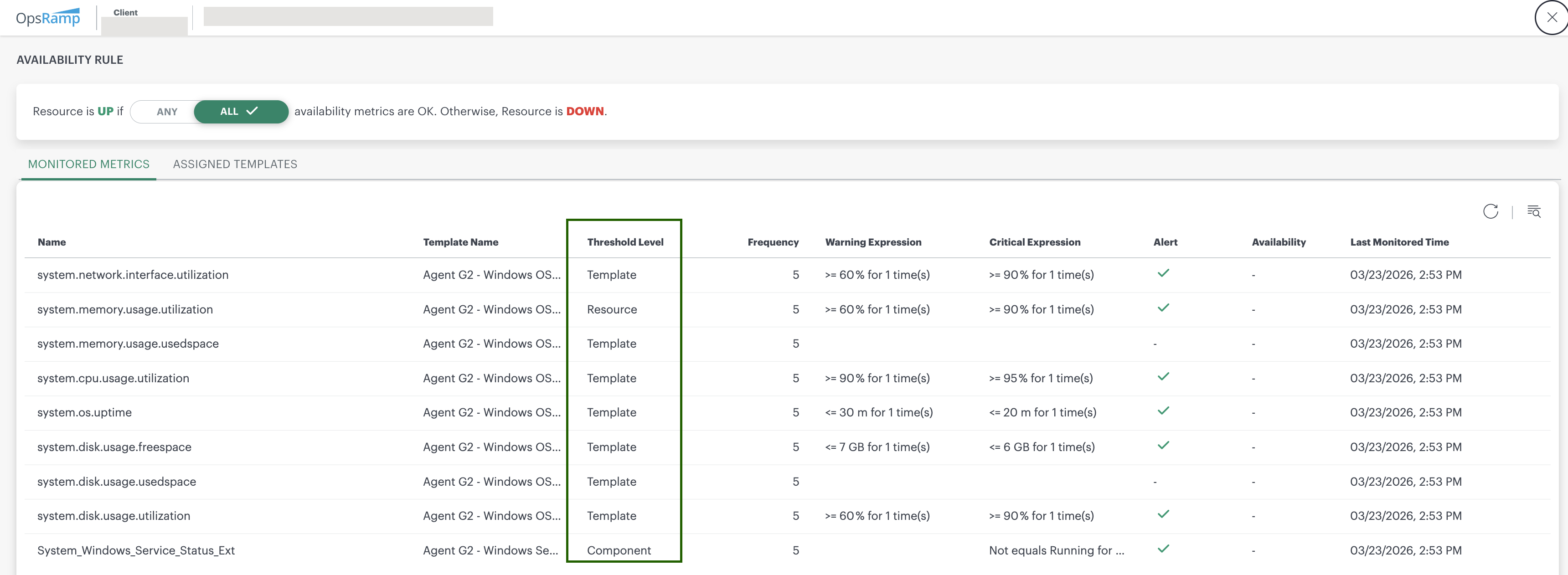
OpsRamp now provides improved visibility into Metric Level Alert Customization Thresholds for monitored resources. You can view the configured Thresholds directly as Threshold Level values in View Monitoring Configuration > Monitored Metrics. This enhancement allows you to quickly review threshold levels for all monitored Metrics without opening each Metric individually.
Alert Definition Moved Under the Monitoring card Enhancement
As part of the phased rollout of the v2 Monitoring UI, the existing Alert Definition option previously available under Setup > Account has been reorganized and moved to Setup > Account > Monitoring > Alert Definition > Metric Based.
In addition, the Setup > Account > Monitoring option is now structured as follows:
Under Metrics & Events Tab: Metrics, Events, Syslog Rules, and SNMP Traps

Under Templates Tab: Templates

Under Alert Definitions Tab: Template Based, Metric Based, and Budget Based

Refer to the Monitoring documentation for more details.
Note
If you do not see Template Based and Budget Based options under the Alert Definitions Tab, your Client is not enabled to use the v2 Monitoring UI. You will see this update in future releases.- Template Based is a replacement for Setup > Setup > Resources > Device Management Policies
- Budget Based is a replacement for Setup > Setup > Monitoring > Budget Policies
Patch Management
RBAC enforcement for Patch Management Enhancement
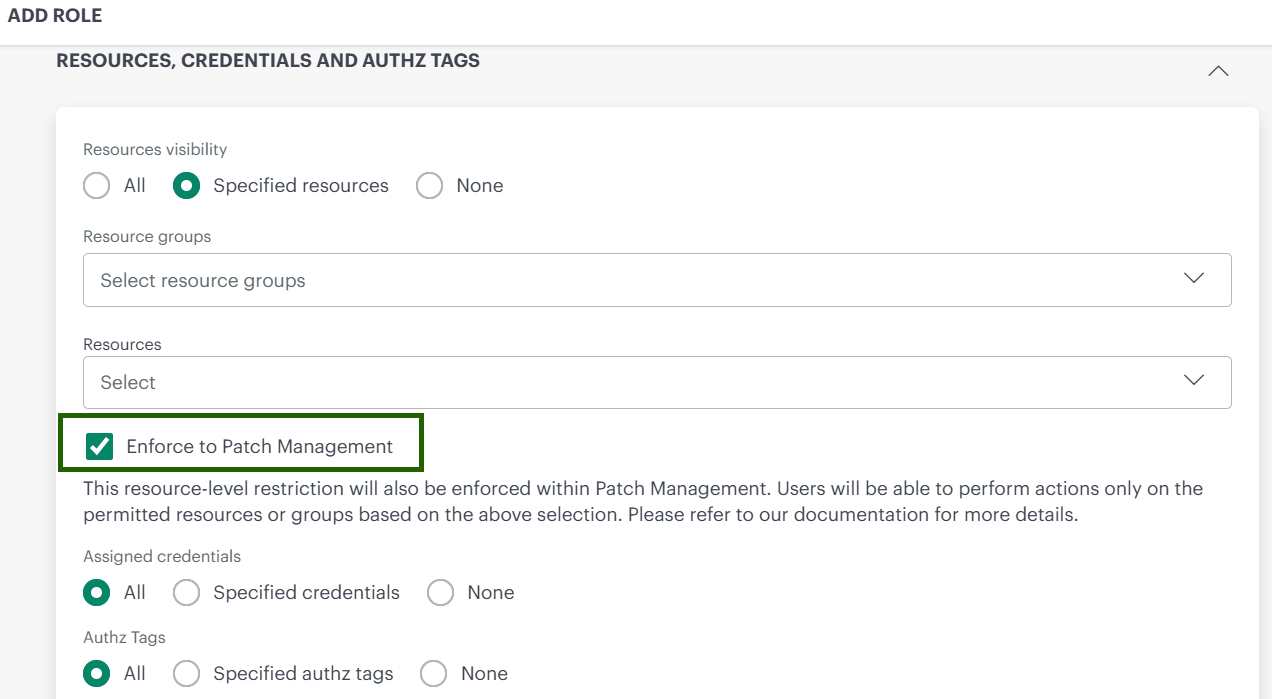
Patch Management now enforces Role-Based Access Control (RBAC) to ensure users can only view, manage, and approve patch jobs for the resources and Resource Groups assigned to them. Previously, users with patch approval permissions could access and manage patch jobs across all Resource Groups, which could lead to accidental or unauthorized patching. This update improves security and governance by restricting patch operations to a user’s assigned scope.
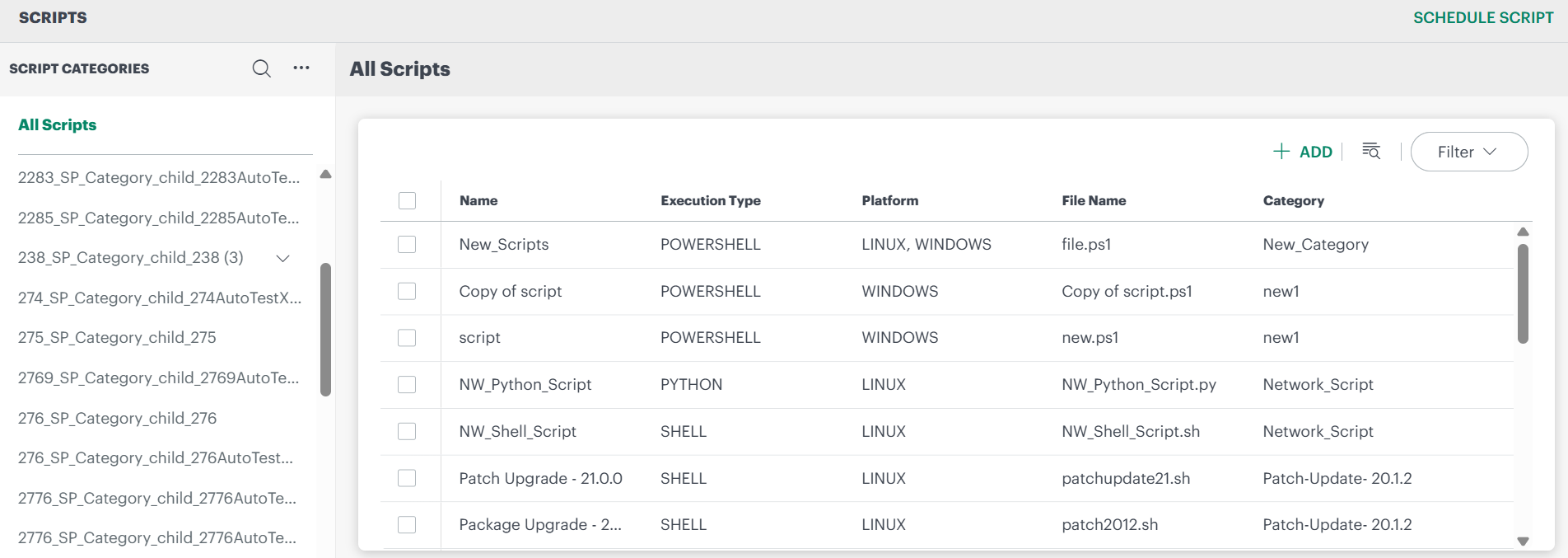
Scripts v2 usability and execution improvements Enhancement
[Scripts v2]({{ relref “/solutions/remediation-automation/scripts-2.0/” }}) has been enhanced to improve usability, execution visibility, and scope-based access control:
- Improved UI and organization: Updated interface with better script categorization and scope-based visibility (Service Provider, Partner, Client)
- Enhanced execution visibility: View execution status, access detailed logs, and export execution data for analysis
- Flexible execution and scheduling: Supports both manual and dynamic resource assignment, along with a Run Now option for immediate execution
- Better search and management: Improved script search and the ability to create, update, and organize script categories across scopes
Process Automation
Increased OpsRamp Gateway loop count limit Enhancement
The maximum loop count for OpsRamp Gateway definitions in process workflows has been increased from 10 to 20. This enhancement allows automation plans to run checks more frequently over a longer duration.
See Define Automation Process for more information.
Added “Credentials in Script” Option for Script Tasks Enhancement
A new Credentials in Script option is now available when creating a Script Task. This enhancement allows you to securely pass one or more credentials to scripts during execution.
With this capability, you can run remote scripts on network devices through the OpsRamp Gateway using Process Automation. The option supports multiple credentials, enabling greater flexibility when executing scripts across different devices and environments.
Note
This is available from 21.0.0 OpsRamp Agent version.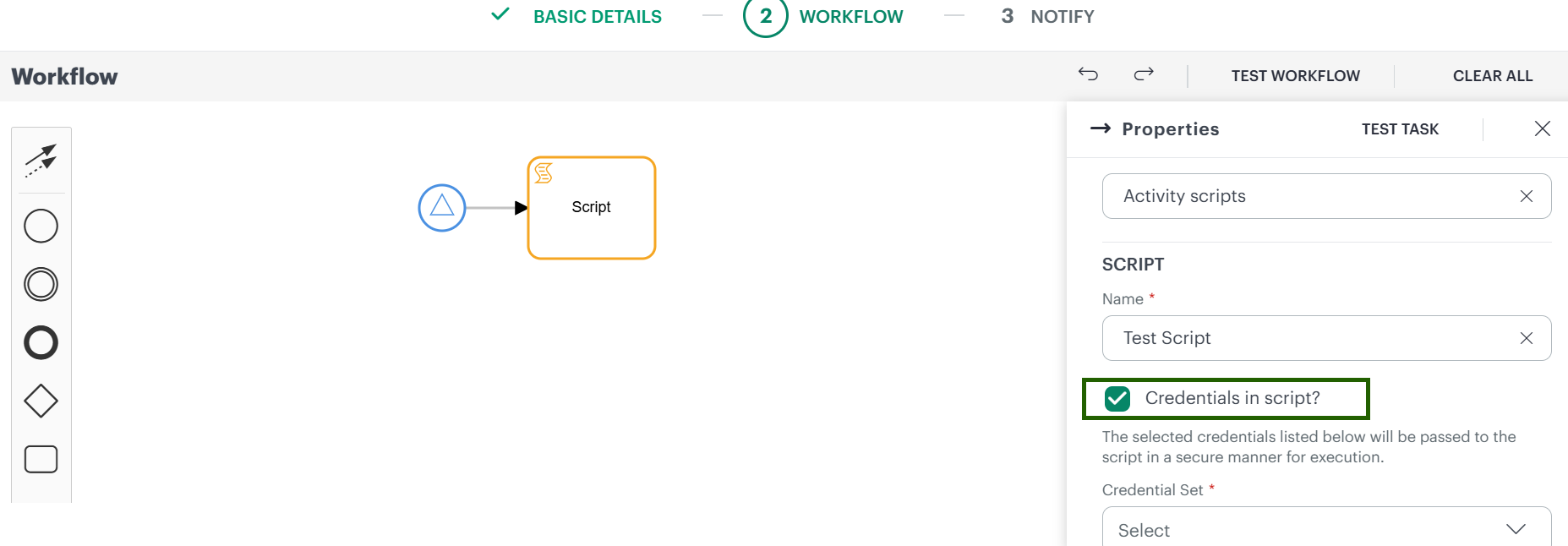
See Process Definition Reference for more information.
Network Topology Management (NTM)
Support for L3 IPsec Tunnel in Topology Explorer Enhancement
SNMP Integration now discovers and visualizes Layer 3 IPsec tunnel links for Cisco and Fortinet devices through Network Topology page, similar to how OSPF and BGP links are displayed. This enhancement provides end‑to‑end visibility of IPsec Tunnel connectivity.
Reporting Apps
Availability Report Enhancement
The Availability report now includes the capability to display deleted and unmanaged resources, providing a more complete and historically accurate view of resource availability.
You can include resources that were decommissioned or no longer part of the active inventory during the selected reporting period.
Include deleted resources
Enable the Include Deleted Resources option to view availability data for deleted or decommissioned resources. This option is available when Availability By is set to Resource.Historical accuracy
Resources are included in the report for the duration they were actively monitored, even if they were later deleted or unmanaged.Improved report structure
- Deleted resources are displayed in a new XLS sheet: Deleted Resources Summary
- Unmanaged resources are included in the existing sheet: Availability Summary - Resources
Clear resource state visibility
Resources are clearly categorized as managed (active) or unmanaged/decommissioned for better analysis.
Reboot details in patch details app Enhancement
The Patch Details app now displays a reboot required column at the Resource level. This enhancement allows users to reboot the Resource only when necessary or at their specified time, rather than immediately after every patch installation. In addition, the app also provides columns showing the Last Reboot Date and the Last Rebooted By. These additions offer users more detailed information and enable better tracking of reboot activities.
Integration Activity App New Feature
Integration Activity is a new app designed to display all actions and activities occurring between third-party tools and the OpsRamp Platform. It meticulously tracks every Event, providing users with the ability to closely monitor the Integration activity and its statuses. This app plays a crucial role in supporting auditing, troubleshooting, and ensuring transparency within Integration workflows that connect third-party Integration tools with the OpsRamp Platform.
Copilot Usage Insights App New Feature
The Copilot Usage Insights App offers a comprehensive and detailed overview of how the AI copilot is being utilized throughout the entire organization. It provides a thorough breakdown of usage statistics, categorized by different agents and large language models (LLMs). Additionally, the app provides user adoption behavior and calculates the success rate percentage, giving valuable insights into the effectiveness and engagement levels of the AI copilot.
Public Cloud
Cradlepoint Interface Metrics Enhancement Enhancement
With this release, two new interface-level Metrics have been introduced for Cradlepoint Integrations, providing enhanced visibility into interface availability and operational status.
New Metrics:
- Interface Connection State (cradlepoint_interface_connection_state)
- Indicates the current connection status of the interface:
- 1 = Connected, 0 = Disconnected, 3 = Unknown
- Interface Uptime (cradlepoint_interface_uptime)
- Represents the total duration the interface has been active, reported in seconds.
Microsoft 365 Service Incident Alerting New Feature
Introduced support for automatic ingestion of Microsoft 365 Service Incident Events using Microsoft Graph APIs. This enables Alert generation for service Incidents, allowing OpsRamp to automatically create and resolve Alerts based on the Incident status in Microsoft 365.
Alerts are generated at the service level and are marked as critical while the Incident is active. Once the Incident is resolved by Microsoft, the corresponding Alerts are automatically healed.
You can configure the polling frequency (15-60 minutes) to control how often service Incidents are checked. This enhancement improves visibility into Microsoft 365 service health and supports proactive Incident response.
Note
Only service Incidents are supported; advisories are not included.Log Management
Standardized Log Severity Level Mapping Enhancement
OpsRamp Log Management now includes expanded and standardized mappings for log severity levels.
Log filtering support for Log archival Enhancement
OpsRamp now supports log filtering under the log archival feature. You can optionally define filters to archive only matching logs to an AWS S3 bucket. If no filter is specified, all client logs are archived by default.
Tracing
Client‑side vs Server‑side Span Duration Visibility Enhancement
OpsRamp Distributed Tracing now supports client‑side and server‑side span duration visibility for service‑to‑service calls. You can compare caller span duration with receiver span duration to identify network latency and infrastructure overhead impacting transactions.
Integration Framework
Configurable Email Notifications for Event Retry Outcomes New Feature
OpsRamp now allows you to receive email Notifications based on the outcome of Event retry attempts:
- Notify on Retry Success: Receive emails when a retry attempt succeeds.
- Notify on Retry Failure: Receive emails when a retry attempt fails.
- Both options selected: Notifications are sent for retry outcomes, whether successful or failed.
Note
This feature applies to Integrations that support outbound Events, such as Custom, Ticketing, and Custom (Ticketing) Integrations.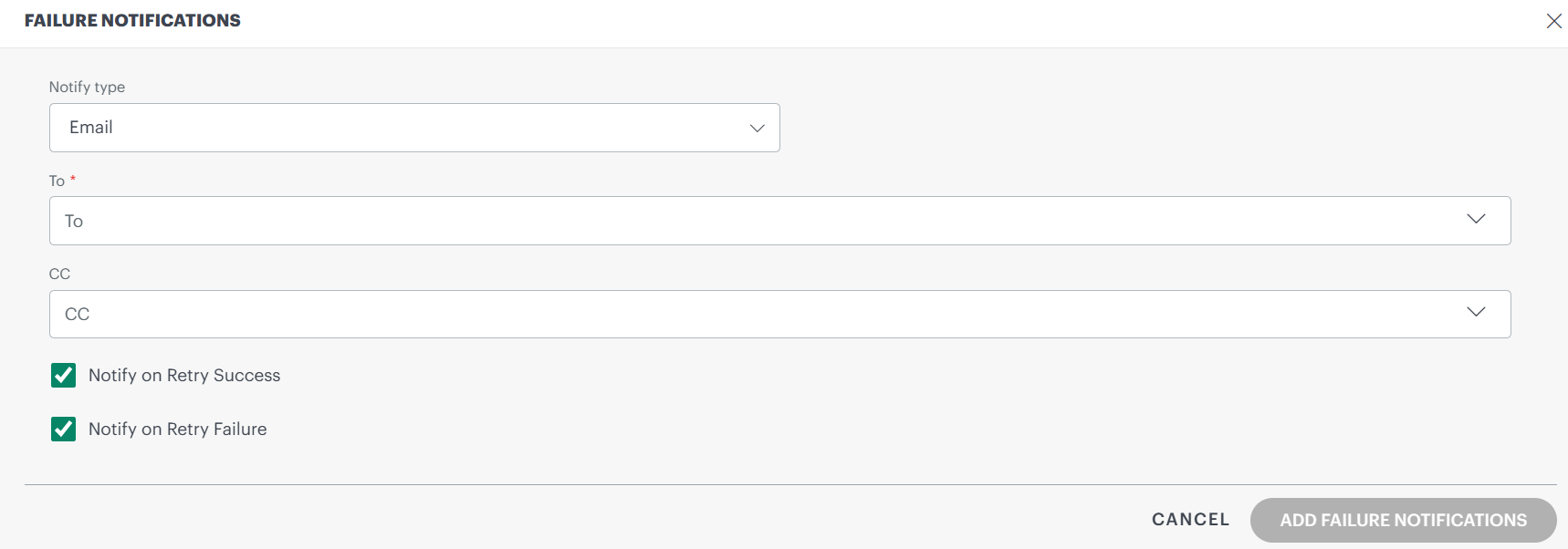
OpenID Connect (OIDC) Single Sign-On Support with Just-In-Time (JIT) User Provisioning New Feature
OpenID Connect (OIDC) SSO with Just-In-Time (JIT) user provisioning is now available as an additional authentication option for Okta and Custom SSO integrations, alongside the existing SAML SSO.
Key capabilities:
- Full Authorization Code Flow with PKCE support
- State and nonce-based CSRF and replay protection
- RS256 ID Token validation using cached JWKS
- IdP-initiated logout support
- Seamless configuration using existing SSO configuration entity with new OIDC-specific fields (client ID, client secret, token endpoint, JWKS URI)
Just-In-Time (JIT) User Provisioning
Automatically create and update user accounts at login time using identity provider claims.
Benefits:
- Automatic user provisioning from OIDC /userinfo endpoint claims
- Reuses existing attribute mapping configuration from SAML JIT
- Zero additional setup required
Removed in This Release
The following features, previously marked as deprecated, are now removed from the OpsRamp platform.
Classic Custom Attributes UI removed
The Classic Custom Attributes screens are no longer available. This change completes the previously announced deprecation.
- Use Setup > Account > Custom Attributes for all configurations.
- Existing data remains available in the new UI.
Refer to the deprecation notice for more details.
Classic Dashboards retired
Classic Dashboards are no longer accessible. You must use modern dashboards.
This change was previously announced in:
Upcoming Deprecations and Removals
The following features will be removed in upcoming releases. Transition to the recommended alternatives to avoid disruption.
June 2026
| Feature | Current Location | Alternative |
|---|---|---|
| Management Profiles | Setup > Setup > Resources > Device Management Policies | Setup > Account > Collector Profiles |
| Discovery and Deployment | Setup > Setup > Resources > Discovery and Deployment | Existing policies will be moved to two different locations as mentioned in [Template-Based Alert Definitions](/solutions/v2-monitoring/alert-definitions/template-based/#device-management-policy-functionality-restructured) |
| Device Management Policies | Setup > Setup > Monitoring > Agent Custom Monitors | Use templates with type Remote Script Executor Agent Note: Unused monitors and agent custom monitors will not be available after removal |
| SNMP Device Type Definitions | Setup > Setup > Resources > SNMP Device Type Definitions | Setup > Account > Integrations > SNMP |
| Templates (Legacy path) | Setup > Setup > Monitoring > Templates | Setup > Account > Monitoring > Templates |
| Monitors | Setup > Setup > Monitoring > Monitors | Setup > Account > Monitoring > Monitors |
| Metrics and Events (Legacy path) | Setup > Setup > Monitoring > Metrics/Events | Setup > Account > Monitoring > Metrics & Events |
| Assign Templates (Legacy path) | Setup > Setup > Monitoring > Assign Templates | Infrastructure > Search > Actions > Assign Templates |
| Budget Policies (Legacy path) | Setup > Setup > Monitoring > Budget Policies | Setup > Account > Monitoring > Alert Definitions > Budget Based |
| Windows Service Configuration | Setup > Setup > Monitoring > Windows Service Configuration | No alternative available |
| SNMP Traps and Syslog Monitor Configuration (Legacy path) | Setup > Setup > Monitoring | Setup > Account > Integrations |
| Agent Custom Monitors | Setup > Setup > Monitoring > Agent Custom Monitors | Use templates with type Remote Script Executor Agent Note: Unused monitors and agent custom monitors will not be available after removal |